Every month we pull together tools, research, and ideas for journalists wearing… many hats.
Featured image: Evgenios Kalofolias
This column started as a newsletter on iMEdD’s LinkedIn.
You can subscribe and find all past issues here.
Media Hat: Out of office-ish edition

Every month we pull together tools, research, and ideas for journalists wearing… many hats.
Hello there!
Each month, we round up tools, ideas, and behind-the-scenes insights to help journalists and media professionals who wear many “hats”: reporters, editors, producers, creators, and everything in between.
Tools worth actually knowing, a hands-on challenge, and one idea from journalism’s margins that might belong in your newsroom.
Up your sleeve
Tools and tricks you can put to work right away
Klaxon
- Access: Web-based
- Cost: Free
Klaxon (by MuckRock Foundation) watches web pages for changes and lets you know when something updates. You can monitor an entire page or just a specific section, useful for keeping an eye on court dockets, government websites, policy pages, prices, or any source that changes over time. Checks can run hourly, daily, or weekly, and snapshots are archived to the Wayback Machine so you can see what changed and when.
Try it like this:

Install the Klaxon browser extension, open the webpage you want to monitor, and select the whole page or a specific section to track. For example, a government agency page, procurement portal, public database, or official announcement page and choose how often Klaxon should check it. When it flags a change, compare the new version with the previous snapshot to see what was added, removed, or updated.
ShadowBroker
- Access: Self-hosted · Setup needed
- Cost: Free
ShadowBroker brings dozens of public OSINT feeds into one live map: aircraft, ships, satellites, wildfires, conflict events, GPS jamming and internet infrastructure. Switch between 40+ layers to look for signals across different sources without jumping between tools.
 Try it like this:

Install ShadowBroker and run the server and then open it in your browser via localhost. Open the interactive world map and select the layers you want to monitor, such as aircraft, ships, satellites, earthquakes, cameras, GPS interference, or geopolitical events. Click on an object on the map to see the available information ShadowBroker has gathered from public sources.
Now try it on a real story
Tools tend to make more sense once there’s an actual problem to solve.
This time, the tool is Spot, built by DW Innovation. It is an AI-powered tool that helps you narrow down where a photo or video was taken. Instead of searching for a place name, describe the physical clues you can see and how they relate to each other: a church near water, a bridge beside a railway, a tall building next to a park.
Spot turns those observations into an OpenStreetMap search and plots possible matches on a map.
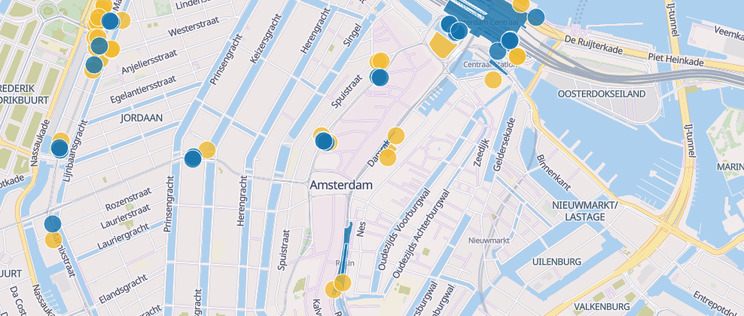
Reporting simulation

One important note: a missing result doesn’t mean the location isn’t there. SPOT depends on crowdsourced OpenStreetMap data, so a feature may simply be missing or differently tagged.
Correct answer
Community spotlight
What if the subscription fits the habit, not the other way around?
The Economist launched Play, a lower-priced subscription for people who prefer to get their news through audio and video: on the commute, walking the dog, or somewhere in between. It lives inside the existing app, giving subscribers all its audio and video without asking them to pay for the full written product.
Early signs are interesting: Play is bringing in mostly new subscribers, while also nudging some people toward the full Premium tier. That’s the idea worth watching: instead of asking new audiences to change how they consume news, build an entry point around how they already do.
Let’s chat!
Found something useful here? Or something we should know about? We’d love to hear from you.
See you next month!